
 MySwissAlps.com includes
 This page was last updated by
  Unlimited travel
Swiss Travel Pass
Unlimited train, bus, & boat travel across Switzerland.
 With discounts
Mountain excursions
Official e-Tickets with pass holder discounts. Skip the ticket counter.
 Unlimited travel
Regional passes
Unlimited travel in the Berner Oberland, Jungfrau Region or Lucerne Region.
Option 1: portable 5g WiFi hotspot for unlimited internet (recommended for convenience and to share with 2 or more people)
There are usually two of us traveling together, carrying two phones and two laptops. We always need reliable high-speed internet. We want unlimited data without needing a separate SIM card for each phone or laptop.
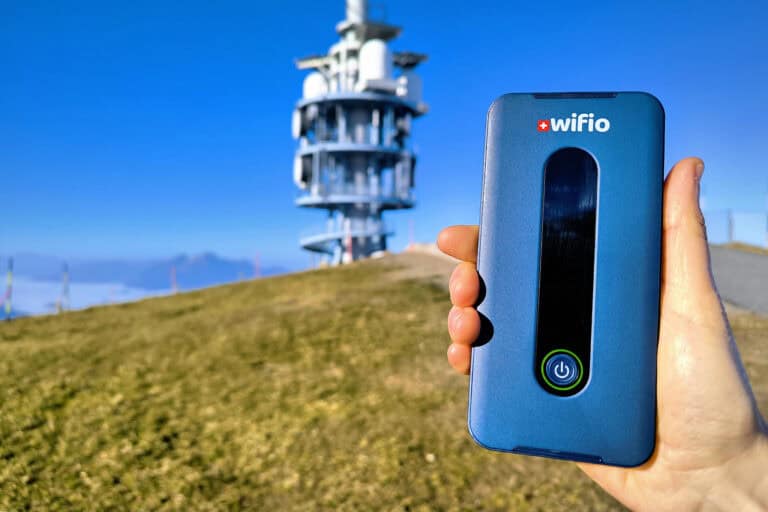
A portable WiFi hotspot is the perfect solution for us. This was previously offered by Travelers Wifi. Its founder has returned with Wifio, a similar service: a small rental device for fast unlimited internet in Switzerland.
I’m delighted to assist MySwissAlps visitors in accessing the best unlimited mobile internet in Switzerland. Feel free to reach out to me anytime for questions or support.
 Philippe, founder of Wifio
Wifio hotspot prices
| Looking for more prices and delivery options? | Rental period | Price |
|---|---|---|
| Check prices (wifio.travel) | 3 days | CHF 31. Save with coupon code MSA10. |
| Check prices (wifio.travel) | 7 days | CHF 35.80. Save with coupon code MSA10. |
| Check prices (wifio.travel) | 14 days | CHF 43.40. Save with coupon code MSA10. |
| Check prices (wifio.travel) | any | See Wifio website. Save with coupon code MSA10. |
Pros and cons of Wifio
I’ve tested Wifio for 4 weeks with 2 people, 2 phones, and 2 laptops. Here’s my opinion:
Advantages:
- It’s very easy to use – even simpler than an eSIM. No configuration is needed on your phone. Just turn on the Wifio, and connect your phone to its WiFi network, like you would at a hotel or home.
- True unlimited data. I watched YouTube on the trains with no issues.
- It’s fast, with 5g where available and 4g elsewhere. See the table below.
- You only need one Wifio for the entire family. You can connect up to 32 phones, laptops, and tablets!
- It’s safe: you’ll be on your private WiFi all the time. No need to access free public WiFi networks.
- You can add coverage for Germany, Italy, France, Austria and Liechtenstein. Do note that you’ll have 3 Gb of 5g data per day in these countries. That is a lot, and almost “unlimited” in practice. Once that data is used up, you’ll still get unlimited data but at a lower speed.
- There’s a version for all of Europe too.
- It’s the size of a phone so no problem to fit in any pocket.
- It always works. Even if your phone doesn’t support eSIMs or if your provider doesn’t allow switching eSIMs.
Disadvantages:
- It’s a physical device, so it must be delivered or collected. This isn’t a big issue, but it’s different from an (e)SIM.
- You need to recharge the device once per day. A charger is included but any USB charger works.
- This is a premium product, so it’s a bit more expensive than an (e)SIM. It’s worth it if you’re serious about your internet connection. Remember that you only pay once to connect all your phones and laptops.
The ease of use and unlimited data are my main reasons to use Wifio. From my experience, even an eSIM can fail. Also hotel WiFi isn’t guaranteed: one time they gave me the wrong password and it took a weekend to figure that out. Wifio simply works on any phone and any laptop.
 Arno from MySwissAlps
How to use Wifio
- Order from https://wifio.travel (🏷️10% off with coupon code MSA10). You can have it delivered to your accommodation, or you can collect it at Zurich Airport, the Zurich main station, or one of the other pick-up locations.
- Once you have the Wifio device in hand, press the round power button and wait a few seconds until the display shows it is enabled.
- Find the WiFi network name and password on the back of the Wifio. Use this information to connect your phone or other devices. You can also use the QR code if your phone supports it. Your phone will display one or two Wifio networks, depending on the data bandwidths it supports. If you see a network named “wifio-2.4G” and one named “wifio-5G”, I recommend selecting “wifio-5G” for the best speed. But both will work. You can even connect your devices before reaching Switzerland, but you won’t be able to access the internet yet.
- Before heading out, make sure the Wifio is charged and bring the charger as a backup. Normally you won’t need to recharge until the end of the day. If no devices are connected to the Wifio for 10 minutes, it will go into standby mode to save battery consumption. Tap the power button once to wake up the hotspot. This normally does not happen unless you turn off your phones.
- Before you return home, put the Wifio and charger in the included return envelope. Drop it into any Swiss Post mailbox or at a post office. You can also drop it at one of their collection locations.


My speed test of Wifio
I used Wifio for 4 weeks in Swiss towns, on mountaintops, and in tunnels, and briefly in Germany and The Netherlands. I tested the speed in 100 locations. Below is a sample of my findings.
| Download speed (Mbps) | Upload speed (Mbps) | Location |
|---|---|---|
| 94.5 | 5.87 | Alp Grüm, Switzerland (Bernina Express) |
| 394 | 96.3 | Basel, Switzerland |
| 123 | 67.2 | Bern, Switzerland |
| 50.3 | 18.4 | Chur, Switzerland (Bernina Express, Glacier Express) |
| 93.2 | 22.4 | Engelberg, Switzerland |
| 897 | 133 | Konolfingen, Switzerland |
| 466 | 58 | Lucerne, Switzerland (GoldenPass line, Voralpen-Express) |
| 16.5 | 24.3 | Mt. Pilatus, Switzerland |
| 167 | 63.6 | Mt. Rigi, Switzerland |
| 217 | 6.41 | Oberalp Pass, Switzerland (Glacier Express) |
| 457 | 95.7 | St. Gallen, Switzerland (Voralpen-Express) |
| 457 | 49.1 | Stoos, Switzerland |
| 10.1 | 16 | Vereina tunnel, Switzerland |
| 107 | 50.3 | Wasserfluh tunnel, Switzerland (Voralpen-Express) |
| 599 | 110 | Zuoz, Switzerland |
| 21.3 | 2.6 | Zurich Airport train tunnel, Switzerland |
| 46.7 | 9.38 | Zurich, Switzerland |
| 170 | 7.4 | Cologne Messe/Deutz, Germany |
| 59.1 | 28.4 | Emmerich, Germany |
| 384 | 22 | Wiesbaden, Germany |
| 57.7 | 33.5 | Arnhem, The Netherlands |
| 204 | 3.79 | Ruurlo, The Netherlands |
| 478 | 34.5 | Zevenaar, The Netherlands |
Video 
Option 2: high-speed budget eSIM (recommended to save money)
eSIMs are electronic, downloadable SIM cards. A physical SIM card is not needed. If your phone supports it, an eSIM is likely your best budget option for mobile internet in Switzerland.
The eSIM I use: the O2 Travel Plus eSIM
Here’s why I recommend this eSIM:
- It’s only $23 for 30 days. Check the current price on www.esim.net/O2/Travelplus and apply the voucher code MYSWISSALPS for a 5% discount.
- It includes 35 Gb of data, with no daily limits. I use about 0.5 Gb per day.
- It allows your phone to be configured as a WiFi hotspot. So you only need to buy one eSIM and you can share the data with multiple people.
- It includes high-speed internet (up to 5G) and didn’t fail me a single time. I measured an average download speed of 300 Mbps and an upload speed of 60 Mbps.
- It works in Switzerland and the rest of Europe. I used it in Germany as well.
I compared a lot of eSIMs. Most are either more expensive, don’t allow using the hotspot on your phone, don’t offer 5G, have daily limits, or a combination of issues.
How to use the O2 Travel Plus eSIM
- Check if your phone supports eSIM. Most phones do. Also, check if your phone is unlocked, which allows installing any SIM from any carrier. This is usually no problem, but it’s worth checking, especially if you recently purchased a phone from a network carrier. Get in touch with them if they have restricted you to using their network only. If they can’t solve that for you, then use the Wifio hotspot instead.
- Buy the eSIM from www.esim.net/O2/Travelplus (use the voucher code MYSWISSALPS for a 5% discount). Do this shortly before your trip, because the 30 days start immediately. A QR code will be e-mailed immediately.
- Go to your phone settings to add the eSIM. It’s best to do this once you’re in a supported country. The QR code can be scanned from a different device like a laptop. If you only have your phone at hand, the QR code in the PDF document can also be imported into the phone where the eSIM needs to be installed. You may have to convert it to an image if your phone doesn’t allow opening a PDF for this purpose. Or, you can enter the QR code manually.
- Try if you can access the internet. If not, check this:
- Select your regular SIM as the default SIM for calls, and the eSIM as the default SIM for data.
- Allow data roaming.
- Wait for 20 minutes. Reboot your phone if the problem remains.
- If none of this helps, check their website and get in touch: www.esim.net/contactus.
- Optionally: go to your phone settings and configure your WiFi hotspot. Set a network name and a password. Give those to anyone you’ll allow to access the internet via your eSIM. They must stay within your proximity (10 m usually) to connect. If you want everyone to access the internet independently, you can buy an eSIM for each.
- You can always log into your esim.net account to see how much data you’ve used.
My speed test of the O2 Travel Plus eSIM
I tested the eSIM speed in multiple locations in Switzerland and a few in Germany.
| Download speed (Mbps) | Upload speed (Mbps) | Ping time (ms) | Location |
|---|---|---|---|
| 168 | 67 | 105 | Andermatt, Switzerland (Glacier Express) |
| 365 | 52 | 79 | Bern, Switzerland |
| 302 | 62 | 350 | Fürgangen, Switzerland (Glacier Express) |
| 355 | 67 | 65 | Interlaken, Switzerland (GoldenPass line) |
| 329 | 63 | 75 | La Neuveville, Switzerland |
| 427 | 110 | 72 | Lausanne, Switzerland |
| 61 | 10 | 132 | Lötschberg tunnel (Kandersteg-Goppenstein), Switzerland |
| 54 | 36 | 81 | Murten, Switzerland |
| 148 | 41 | 118 | Spiez, Switzerland (GoldenPass line) |
| 221 | 34 | 70 | St. Niklaus, Switzerland (Glacier Express) |
| 593 | 74 | 73 | Yverdon-les-Bains, Switzerland |
| 596 | 88 | 69 | Zermatt (Sunnegga), Switzerland (Glacier Express) |
| 9 | 9 | 93 | Motorway A3, Germany |
| 14 | 39 | 85 | Motorway A5, Germany |
| 42 | 11 | 85 | Viernheim, Germany |
Alternative eSIMs for Switzerland
If my recommended eSIM isn’t the right choice for you, then the below alternatives might be:
- wifio.travel: a Swiss eSIM with unlimited high-speed data. Apply the voucher code MSA10 for a 10% discount.
- www.airalo.com/switzerland-esim: Airalo Pilatus Mobile eSIM. It’s suitable if you only need a bit of data or if you only stay in Switzerland for a few days.
- www.airalo.com/europe-esim: Airalo Eurolink eSIM. I recommend this if you only need a bit of data and visit other countries too.
- www.holafly.com/esim-switzerland/: Holafly eSIM. Apply discount code MYSWISSALPS for a discount.
Unlimited travel
Swiss Travel Pass
Unlimited train, bus, & boat travel across Switzerland.
With discounts
Mountain excursions
Official e-Tickets with pass holder discounts. Skip the ticket counter.
Unlimited travel
Regional passes
Unlimited travel in the Berner Oberland, Jungfrau Region or Lucerne Region.
Option 3: high-speed eSIM with unlimited data
The Wifio eSIM offers a great combination of unlimited 5g data and the ability to use your phone as a hotspot.
Advantages
- Buy it for any number of days. For example: CHF 1.55/day for 7 days, or CHF 1.15/day for 14 days.
- Unlimited data.
- It allows your phone to be used as a WiFi hotspot. Buy one eSIM and share your internet connection with your family!
- High-speed internet (5g).
- You can pre-order. Your eSIM will be e-mailed one day before the chosen date.
Disadvantages
- It only works in Switzerland.
- Calls are not included. You’ll keep using your regular phone number.
How to order the Wifio eSIM
- Order from https://wifio.travel.
- Select a start date and end date.
- Apply the voucher code MSA10 for a 10% discount.
- Wait for the e-mail with instructions. You’ll receive it immediately if today is the start date.
Option 4: keep using the (e)SIM you have at home
If you live in the EU, calls and internet usage on your cell phone cost the same whether you’re in your own country or elsewhere in the EU. So you may not need to buy anything if rates, data speed, and data amounts are just fine for your holidays as well. Note that Switzerland is not a member state of the EU. Many providers do count Switzerland as an EU country. Some don’t, so in that case you’ll pay more.
Try to estimate how much you will call and how much data you will need during your stay. Check the rates of your provider for calls and data in Switzerland. It can still be cheaper to buy a SIM card.
Unlimited travel
Swiss Travel Pass
Unlimited train, bus, & boat travel across Switzerland.
With discounts
Mountain excursions
Official e-Tickets with pass holder discounts. Skip the ticket counter.
Unlimited travel
Regional passes
Unlimited travel in the Berner Oberland, Jungfrau Region or Lucerne Region.
Related practical info